/
Remote printer configuration: HP UX 10.20
Remote printer configuration: HP UX 10.20
- Support
Owned by Support
Login as root user and run sam to configure printer.
- As root, run /usr/bin/sam or /usr/sbin/sam.
- Double-click each Printers and Plotters -> LPSpooler -> Printers/Plotters.
- Click Actions -> Add remote Printer/Plotter... in the menu.
- In the printer configuration window, enter the following:
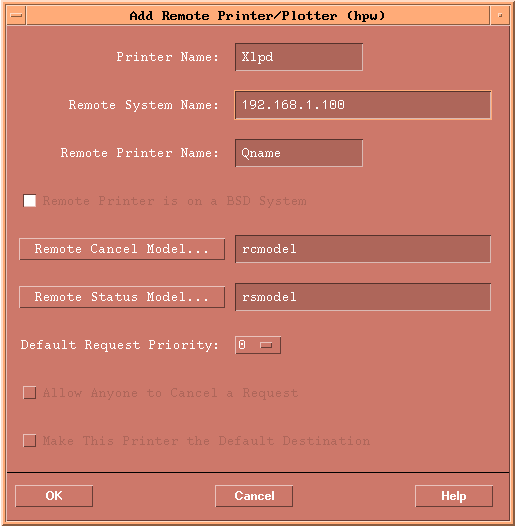
- Printer Name: printer name to be used on the print command line.
- Remote System Name: IP address or hostname of the PC where Xlpd is installed. If the IP address is not accepted, then the hostname should be registered in /etc/hosts file as explained in General setup.
- Remote Printer Name: Enter the queue name registered in Xlpd. If this name is not already registered in Xlpd and a print job is sent to Xlpd using this queue, then Xlpd will print the job using its default queue or create a new queue automatically depending on the Xlpd settings.
- Remote Printer is on a BSD system: this field must be checked.
- Leave other fields as default.
- Click OK to exit sam.
To print a file on HP UX 10.x, the following command line is used.
$ /usr/bin/lpr -dPrinter_name filename
Related content
HP UX Printer Setting
HP UX Printer Setting
More like this
HP UX Printer Setting
HP UX Printer Setting
More like this
Remote printer configuration: Redhat Linux 9.x, 8.x, 7.x, 6.x
Remote printer configuration: Redhat Linux 9.x, 8.x, 7.x, 6.x
More like this
General Setup
General Setup
More like this
General Setup
General Setup
More like this
Remote printer configuration: SuSE Linux 9.0, 8.0
Remote printer configuration: SuSE Linux 9.0, 8.0
More like this